Seeing Aurora Forecasts at a Glance on Your Home Screen
After a few real aurora hunting trips, I quickly realized that relying only on alerts is not enough. Space weather changes more often than we expect, and even when a good window opens up, it is surprisingly easy to miss that moment. I wanted something more than an app that I open only when I remember to check. I needed a way to glance at today's aurora conditions every time I casually wake my phone.
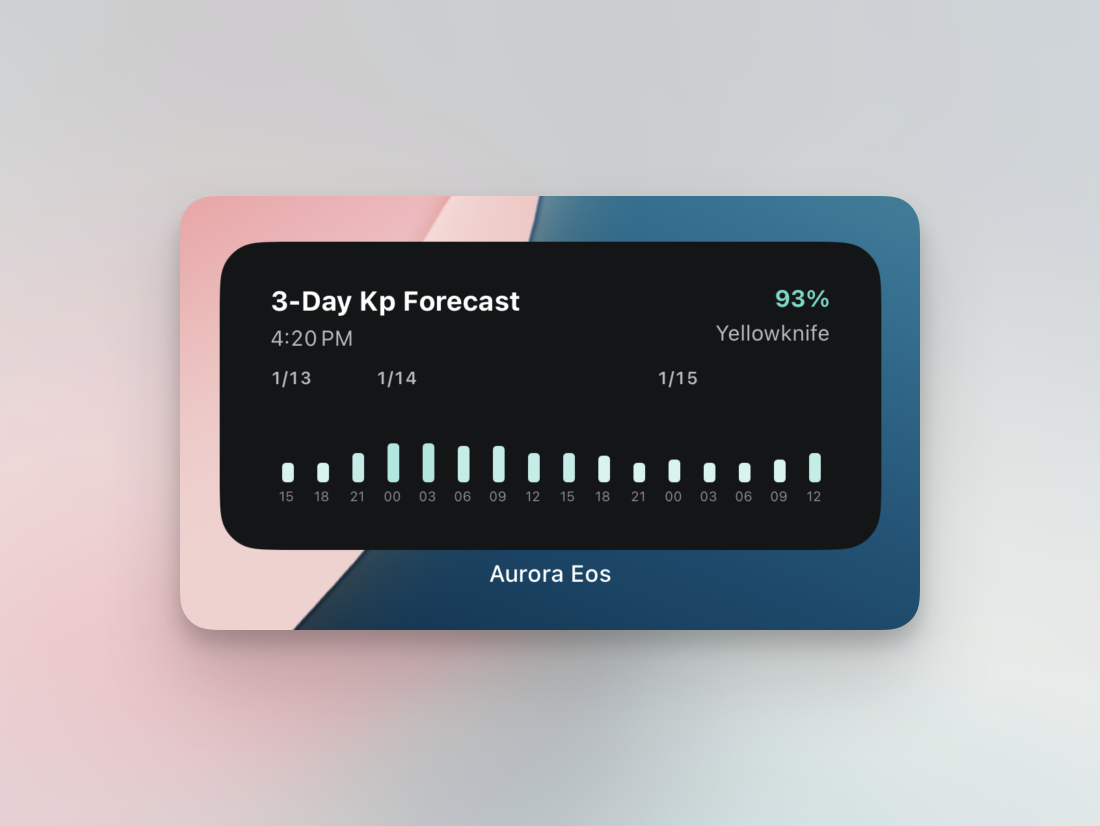
The answer was a home screen widget. Without unlocking the phone or launching the app, you can simply look at the clock and, in the same motion, scan the Kp bars. That small habit completely changes the rhythm of aurora hunting. In this post, I want to share how the Aurora Eos "3-Day Kp Forecast" home widget came to life and how you can make the most of it on your own trips.
1. Widget Overview
The global Kp index is a great starting point, but it cannot fully describe what is happening right above the place where you are standing. That is why I decided to show it together with a more local and reliable metric: the Ovation model. Ovation is an aurora forecast model provided by NOAA, built from satellite measurements of solar wind and the Earth's magnetic field. It estimates the charged particle currents around the polar regions and turns them into a map of "how likely you are to see aurora at each location".
In Aurora Eos, the widget focuses on combining Kp and Ovation. Kp helps you quickly grasp the overall level of geomagnetic activity across the globe—whether today feels quiet or energetic. Ovation, on the other hand, zooms into your saved spots and tells you how likely it is that the sky will actually light up there. When you read these two values together, you are no longer guessing from a single number; you are making a much clearer decision about when and where to head out.
That is why the widget shows the real-time Ovation probability for your chosen location in the top right corner. Instead of only staring at a row of Kp bars, you can look at your saved points—Yellowknife, Whitehorse, Reykjavik, or anywhere else—and instantly judge whether it is worth stepping outside. Think of it as a two-step thought process packed into a single card: Kp sets the mood, and Ovation gives you the final push.
2. How to Add and Set Up the Widget
My goal for the widget was simple: "once you install it, it should just work". If you follow the steps below once, the widget will keep updating in the background so that your home screen always feels like a small aurora dashboard.
- On iOS, long-press on the home screen to enter edit mode, tap the + button in the top left, and search for Aurora Eos. Choose the "3-Day Kp Forecast" widget, pick a size, and add it to your home screen.
- On Android, long-press on an empty area of the home screen and open the Widgets menu. Find Aurora Eos, select the same widget, and place it wherever you like.
- After adding the widget, open the app once to set your current location or a favorite observing spot. The widget uses this location when showing both Kp and Ovation probability.
- I personally like placing the widget near the clock or calendar. Every time I check the time in the morning, during lunch, or before going to bed, I end up glancing at the aurora conditions almost without thinking.
3. Tips for Using the Widget on Real Aurora Hunts
The bars in the widget show the Kp forecast for the next three days, broken down by hour. Taller bars mean stronger geomagnetic activity and a better chance of seeing aurora at lower latitudes. However, Kp is still just a way of describing the overall environment, so it is important to always check cloud cover and local weather as well.
The widget also helps with planning your night out. Before leaving work, I quickly scan the Kp pattern for the evening and set an alarm if the peak seems likely to come around dawn. When I am traveling, I save several locations along my route as favorites and compare the Ovation probability for each one. Sometimes moving just a little can make the difference between a cloudy sky and a clear, glowing one.
I will soon be heading back to Canada for another long trip. March includes the spring equinox, one of the most active times of the year for auroras. I plan to keep using this widget in the field and to improve it whenever I run into something that could be clearer or more helpful. If you ever find yourself thinking, \"I wish this index was also visible,\" or \"It would be easier to read if the layout looked like this,\" please feel free to send your feedback. I hope the Aurora Eos home screen widget makes your night sky a little more exciting.