See where the sunlight will come from before you go
Before going out to take photos, choosing a place for a walk, or picking a seat by the window, it helps to know where the light will come from. Golden Horizon now includes a Sun Direction Map. It shows the direction of the Sun on the map for the place, date, and time you choose.
Sunrise and sunset times alone do not always make it easy to picture where the light will be. The Sun Direction Map turns that information into lines on the map. Choose a place you plan to visit, move through the time, and you can see the Sun's direction at that moment more intuitively.
How to read the lines on the map
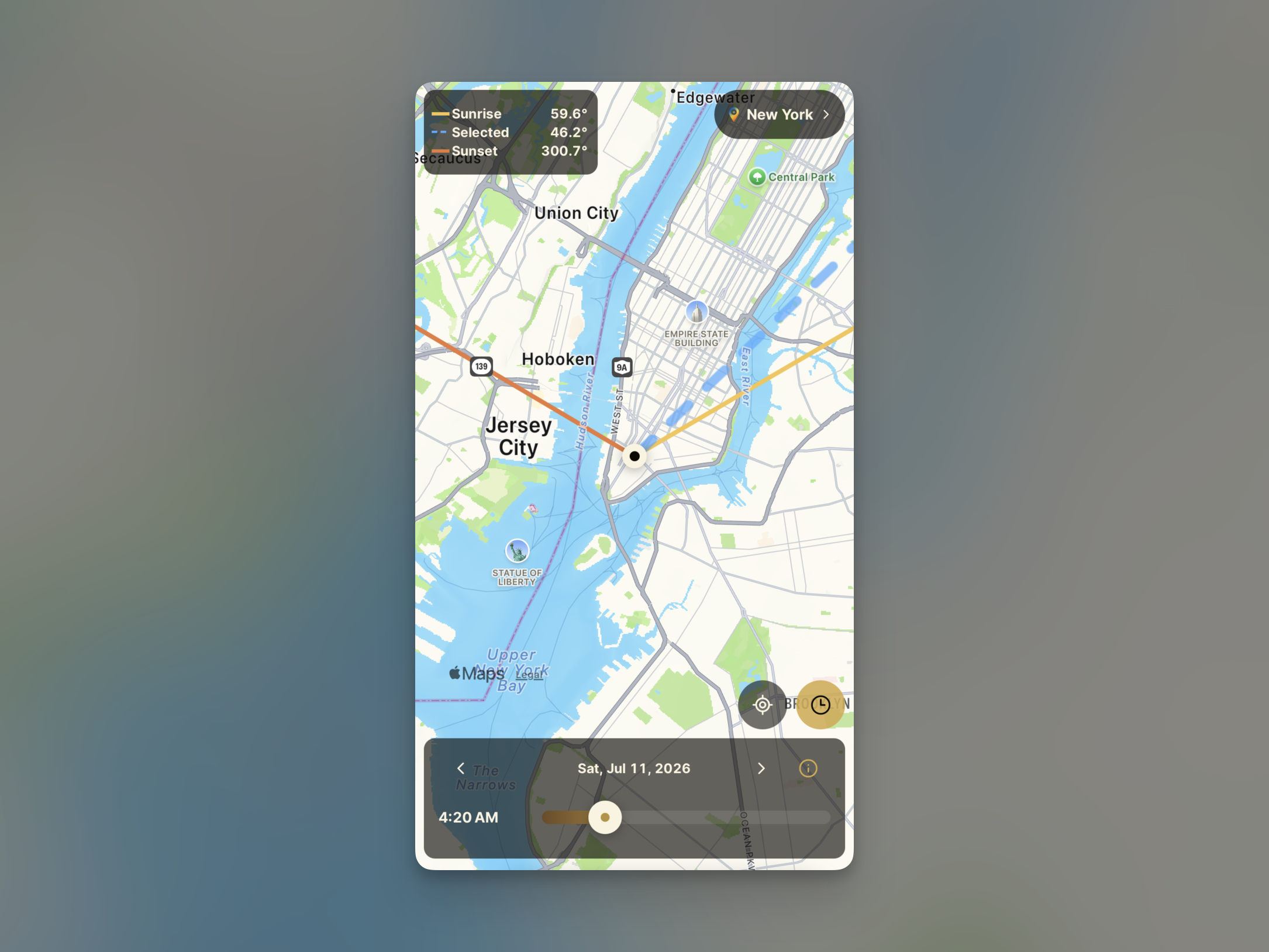
The black dot at the center of the map is your reference location. The lines extending from it show the direction of the Sun from that place. Each line represents a different moment, making it easier to compare how the light moves through the day.
- Yellow line: sunrise direction
- Blue line: Sun direction at the selected time
- Orange line: sunset direction
The numbers next to the lines show the azimuth. Azimuth is measured clockwise from north: 90° is east, 180° is south, and 270° is west. So a sunrise azimuth of 60° means the Sun rises in the northeast, while a sunset azimuth of 300° means it sets toward the west-northwest.
Choose a place and move through time
Using the map is simple. First, choose the place you want to check. Then change the date and move the time slider at the bottom of the screen. The blue line updates to show the Sun's direction at the time you selected. The direction of sunrise and sunset changes with the seasons, so it is useful to set both the place and the date when planning a trip or a shoot.
Move the time to just after sunrise when you want to plan for morning light, or closer to sunset when you are looking for warmer evening color. Compare the direction of the line with the position of a building, landscape, or body of water to get a clearer sense of where the light will come from.
When this is useful
The Sun Direction Map is useful whenever you want to plan around natural light without extra equipment. Before a golden hour shoot, it can help you think about whether the Sun will be in front of, behind, or to the side of your subject. When traveling, it can also help you choose a path or viewpoint that faces the morning light or the sunset.
Use azimuth to check the direction of light
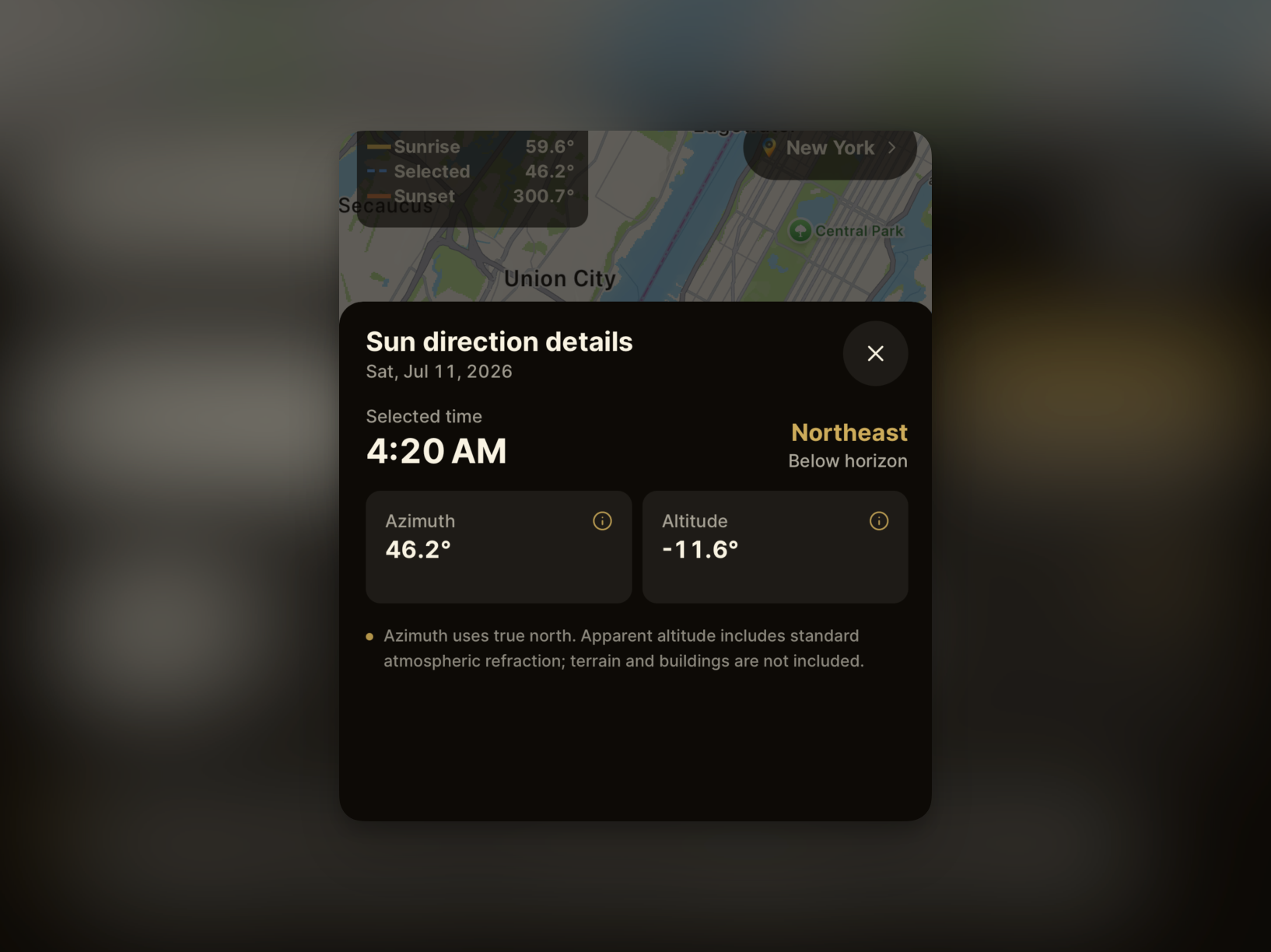
For more detailed planning, open the detail screen and check the azimuth. It shows where the Sun sits along the horizon. For example, if the building or landscape you want to photograph is east of you, a morning azimuth near east may place the Sun in the same direction as your subject. Later in the day, an azimuth nearer west can place the light behind you instead. Comparing the map line with the direction of your subject helps you anticipate backlighting, side lighting, or front lighting.
Use altitude to understand the Sun's height and shadows
Altitude shows how high the Sun is above the horizon. At 0°, the Sun is at the horizon around sunrise or sunset. Higher values mean the Sun is higher in the sky. At low altitudes, light comes in from the side and casts longer shadows, which can bring out texture and depth in a landscape. When the altitude is higher, light falls more from above and shadows tend to be shorter. An altitude below 0° means the Sun is below the horizon, so direct sunlight is unlikely at that time.
It can also help with everyday decisions: choosing an outdoor seat, estimating when sunlight will reach a window, or waiting for a day when the Sun sets behind a particular building or landscape. Checking the map before looking up can become a small habit that changes how you experience the light that day.
Wrapping up
The Sun Direction Map goes one step beyond checking sunrise and sunset times. It helps you understand where the light will come from. The real appearance of light can still change with buildings, mountains, trees, clouds, and weather, so use the map to check the direction and time first, then take in the sky when you arrive.
Before your next outing, choose a place and time in Golden Horizon. You can see where today's Sun will rise, where it is now, and where it will set before you leave.