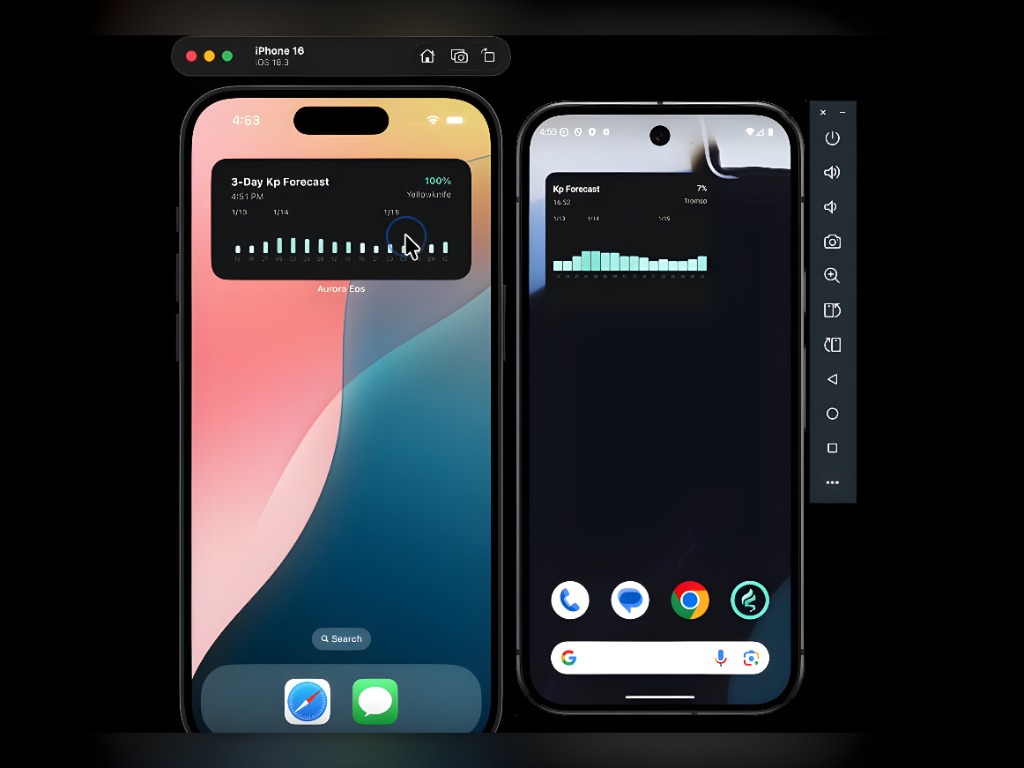
I've been developing cross-platform apps using Expo since 2022. Since 2024, as Expo solidified its position as the standard framework for React Native, its stability has significantly improved, and many native constraints have been resolved.
In this post, I want to share my experience introducing and operating iOS and Android widgets across three apps since last year. Now, with the help of AI, it's easier than ever to create native widgets without having to write Kotlin or Swift code entirely from scratch.
The Need for Widgets
Widgets allow users to quickly check core information right from their home screen without actually opening the app. This is especially crucial for apps like Golden Horizon, which displays the ever-changing positions of the sun and moon.
Reference link: Apple Home Screen Widgets (Evan Bacon)
Library Selection — Deep Thoughts on Dependencies and Stability
Initially, I implemented widgets using the @bittingz/expo-widgets library, which supports both platforms. Being able to cover both iOS and Android with a single library was appealing, but soon after, I started experiencing build errors when upgrading Expo SDK versions. This is one of the most stressful parts of using Expo—because React Native is still in its 0.x.x major version, breaking changes happen quite frequently.
iOS: @bacons/apple-targets
Then, I heard about the release of @bacons/apple-targets, created by Expo Engineering Manager Evan Bacon. Since the maintainer is part of the Expo core team, I determined that future maintenance responses to Expo SDK updates would be much faster and more stable, so I decided to migrate iOS to this library.
The core of this library is that if you place Swift files in the
targets/ directory, Xcode targets are automatically generated
during prebuild. Although you have to write the widget UI directly in SwiftUI,
Expo manages the target configuration and build pipeline, which greatly lowers
the barrier to entry for native development.
Android: react-native-android-widget
For Android, I chose react-native-android-widget, which is
relatively actively maintained. The biggest advantage of this library is that
you can write the widget UI using React Native components. You create layouts
by combining widget-specific components like FlexWidget,
TextWidget, and ImageWidget, and handle lifecycle
events in a Task Handler.
Development Methods for Each Platform and Solving Major Technical Challenges
Setting aside specific app implementation logic, this section summarizes the overall technical hurdles and solutions I encountered during widget development. Looking back, actively creating and utilizing local custom native modules (Local Expo Modules) instead of relying solely on external libraries was the most helpful approach to bypass platform constraints and increase stability.
1. Background Refresh Strategy
Since widgets need to display data that changes from moment to moment,
background refresh is essential. For iOS, it was efficient to
use the system timeline to provide a future data change schedule in advance,
letting the OS manage the refreshes. On the other hand,
Android required its own scheduling, so I had to use
WorkManager to implement periodic refresh tasks (e.g., at least
every 15 minutes) in the background.
2. App Data Synchronization and API Key Injection (Developing widget-storage)
The main app and the widget processes are separated, so they cannot share
things like AsyncStorage. To solve this, I developed a local
custom native module (widget-storage) that binds
App Group UserDefaults for iOS and
SharedPreferences for Android into a common interface. I
created a structure where the widget could immediately read data or user
states saved by the app.
Injecting sensitive environment variables like API keys worked similarly. For
iOS, I injected them directly into the Info.plist at build time,
while for Android, I safely passed the values at runtime through the
widget-storage module.
3. Differences in UI Implementation Methods
For iOS, I had to write the UI directly in SwiftUI via
WidgetKit, whereas for Android, I constructed the layout with
React components (like FlexWidget) via
react-native-android-widget.
To overcome the limitations of UI elements supported by each platform (e.g., Android widgets not supporting complex gradients), I maintained consistent quality by bypassing difficult-to-code layouts or graphic elements and instead utilizing pre-rendered SVG images.
4. Caching and Preventing Unnecessary API Calls
A strict caching strategy was essential to prevent widgets from going completely blank when the network is unstable. I shared cache data between the app and the widget, and prioritized reusing the existing cache when under "similar conditions" (e.g., same date and location). Even if an API call failed, I designed a fallback to display the previous widget screen as-is, ensuring the user experience wasn't broken.
1-Year Review of Operating Widgets
- Understanding the native ecosystem is essential: With the help of AI, directly writing Kotlin or Swift code from scratch has significantly decreased. However, understanding how native development works, and knowing how to handle and debug editors like Xcode or Android Studio, was necessary to overcome crises.
- An opportunity to learn native features for each platform: It was important to clearly understand the characteristics of native modules provided by each platform (iOS, Android). Through this project, I was able to greatly expand my knowledge related to lifecycles, such as booting up a closed app to wake it or updating UI to the latest state in a background environment.
- Limitations and regrets of cross-platform: Despite using an excellent cross-platform framework like Expo, my biggest regret is that for widgets, you still have to write native code for each platform and implement the UI completely separately.
Building cross-platform widgets in an Expo environment is still far from the ideal of "write once, run anywhere." However, the ability to work on top of Expo's build system and Config Plugin ecosystem remains a huge advantage. The flow of generating a native project with a single prebuild, all the way to deployment via EAS Build, definitely reduces operational costs compared to pure native development.
Widgets are not just simple add-ons; they are a brand's touchpoint existing right on the user's home screen. Moving forward, I plan to continue expanding the ecosystem by actively utilizing other forms of native features, such as iOS Lock Screen widgets or Health app integrations.